Star Wars Language Tools
Download Aurebesh Font
Install the Aurebesh font on your device and type Star Wars script directly in any app — Word, Photoshop, Canva, Illustrator, or your phone keyboard.
Free for personal use only. Commercial use — print runs, merchandise, client work — requires a separate license from the font author.
Go to dafont.com
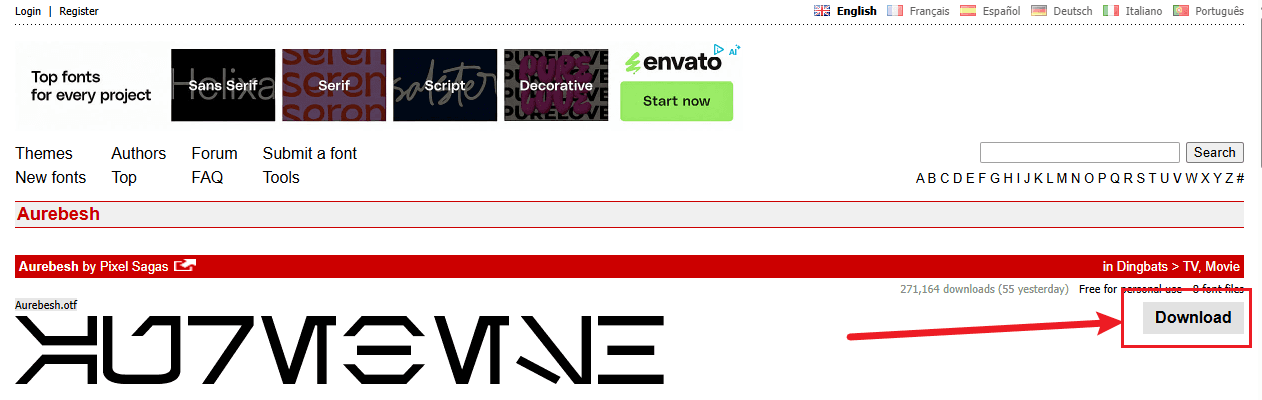
Head to the Aurebesh font page on dafont.com — the largest free font repository on the web. The font has been downloaded millions of times and is safe to use.
Open dafont.com →Click Download
Click the orange Download button on the right side of the page. You'll get a .zip file containing the .ttf font file.
Install the Font
- Unzip the downloaded file
- Right-click the
.ttffile - Select Install or Install for all users
- Restart any open apps to see the font
- Unzip the downloaded file
- Double-click the
.ttffile - Click Install Font in Font Book
- Restart any open apps to see the font
Frequently Asked Questions
Can I use the Aurebesh font for a tattoo?
Yes — but use our online translator first to verify your text, especially for words with dipthongs like TH, SH, CH, or OO. A wrong glyph is permanent. Check the Alphabet Chart before you commit.
Does the font handle dipthongs automatically?
No. A font just maps individual keystrokes to glyphs — it has no awareness of dipthongs. That's why this translator exists. Use it to get the correct glyph sequence, then copy the output.
What apps work with the Aurebesh font?
Any app that lets you choose a font: Microsoft Word, Google Docs, Photoshop, Illustrator, Canva, Figma, Procreate, and most design tools. Once installed, just select 'Aurebesh' from the font list.
Is the font free for commercial use?
The font is free for personal use. Commercial use — merchandise, client projects, print runs — requires a license from the original author. Check the readme file included in the download for details.